
As of June 2025, creators and teams are moving faster than ever. They need AI tools that help them deliver high-quality images, social visuals, marketing assets, and product content without slowing down their workflow. After several weeks of testing dozens of platforms, I narrowed the field to ten tools that genuinely stand out for speed, quality, and range.
AI turns a single Image to video a smooth video by adding motion, depth and animation, creating dynamic clips in seconds.“Create a realistic AI Talking photo where the person speaks naturally with accurate lip sync, expressive facial movement, and smooth voice animation.
Best AI Image Editing Tools at a Glance
| Tool | Best For | Modalities | Platforms | Free Plan | Standout Feature |
| Magic Hour | Fast creative editing for images & short videos | Image, video, face swap, lip sync | Web | Yes | High-quality editing + simple UI |
| Adobe Photoshop (AI) | Professional creative teams | Image | Desktop + Web | Limited | Precise manual + AI hybrid tools |
| Canva AI | Social teams, marketers | Image, design | Web + Mobile | Yes | Templates + easy editing |
| Runway ML | Advanced generative media | Image, video | Web | Limited | Gen-1/Gen-2 video models |
| Pixlr AI | Quick edits | Image | Web | Yes | Lightweight and fast |
| Fotor AI | Social content | Image | Web + Mobile | Yes | Portrait and product edits |
| Remini | Face and portrait quality | Image, mobile | Mobile | Yes | Realistic enhancements |
| Luminar Neo AI | Photographers | Image | Desktop | No | Photo-centric AI adjustments |
| Clipdrop (Stability) | Background removal, fast tools | Image | Web | Yes | Lightning-fast processing |
| PhotoRoom | Product sellers & marketplaces | Image | Web + Mobile | Yes | E-commerce-ready outputs |
The 10 Best AI Image Editing Tools (Full Reviews)
1. Magic Hour — Best Overall for Fast, High-Quality AI Editing
Magic Hour is the platform I kept returning to during testing. It balances quality, speed, and simplicity in a way few tools achieve. Whether I was refining portraits, fixing lighting, or prepping images for social posts, the workflow stayed smooth. The platform also connects well with short-form video creation, which is rare for an image-centric tool.
I tested the AI image editor and found the results clean and consistent without over-processing. It also includes more advanced features like face swap and Lip Sync AI, which open the door for complete content pipelines. You can explore tools like their image-to-video AI feature for mixed-media workflows.
Pros
- Clean, natural-looking outputs
- Smooth workflow for quick edits
- Strong portrait and face-driven tools
- Works for both images and short videos
- Simple UI even for multi-step edits
Cons
- No full desktop app yet
- Heavy workflows might require fast internet.
My take:
If you create visual content daily and want a tool that stays out of your way, Magic Hour is hard to beat. It’s also the easiest for beginners while still delivering the quality experienced users expect.
Price:
Free plan available; paid plans start affordably for creators and small teams.
Try the AI image editor or image-to-video AI to see how fast it works.
2. Adobe Photoshop (AI)
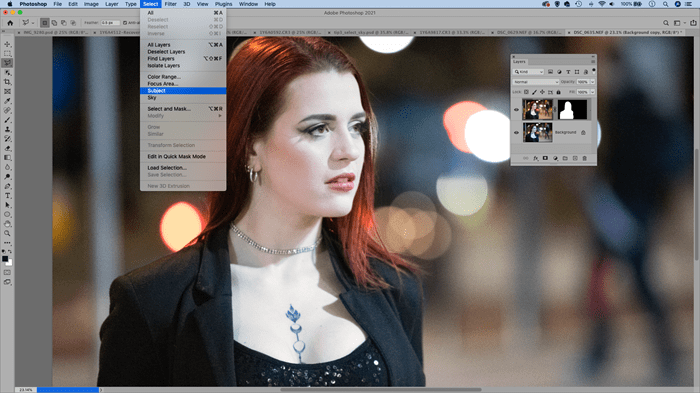
Adobe integrated Firefly into Photoshop, giving editors AI tools such as generative fill, background replacement, object insertion, and lighting control. It’s powerful, especially if you already know Photoshop.
Pros
- High-precision editing
- AI + manual tools work together.
- Trusted professional ecosystem
Cons
- Learning curve
- Requires strong hardware
- Subscription costs add up.
My take:
Photoshop is still the industry standard, but it’s overkill for many creators who just want fast AI adjustments without deep manual work.
Price:
Monthly Creative Cloud subscription.
3. Canva AI
Canva’s AI editor is built for social teams and marketers who need polished graphics quickly. I used it for banners, thumbnails, and marketing visuals.
Pros
- Huge template library
- Strong background removal and retouching
- Great team collaboration
Cons
- Image quality varies
- Less control for detailed edits
My take:
If most of your work ends up on social feeds, Canva is a reliable one-stop shop.
Price:
Free plan; Pro unlocks premium features.
4. Runway ML
Runway focuses on generative media. Their text-to-video models get a lot of attention, but their image features are strong too.
Pros
- Advanced models for experimental visuals
- Strong inpainting and image-to-video
- Good for creative studios and researchers
Cons
- Less intuitive
- Not ideal for quick edits
My take:
I reach for Runway when I want something experimental or cinematic rather than straightforward editing.
Price:
Free tier with limits; paid plans scale for studios.
5. Pixlr AI
Pixlr is a lightweight browser editor. It loads quickly and handles basic tasks without becoming complicated.
Pros
- Fast in the browser
- Clean auto-enhance features
- Easy for beginners
Cons
- Less accurate for portraits
- Occasional artifacts
My take:
Great for quick fixes but not for detailed work.
Price:
Free plan; affordable premium tier.
6. Fotor AI
Fotor leans into portrait editing, filters, and product visuals. I tested it for e-commerce images and saw consistent results.
Pros
- Good product-friendly outputs
- Easy social formatting
- Batch tools
Cons
- Over-processing sometimes
- Limited advanced control
My take:
Useful for marketing teams who want a no-friction tool.
Price:
Free plan and paid tiers.
7. Remini
Known for facial enhancement, Remini is mobile-first and great for portraits.
Pros
- Excellent facial restoration
- Fast on mobile
- Easy workflow
Cons
- Not a full editor
- Can feel stylised
My take:
Ideal for creators who focus heavily on faces and social visuals.
Price:
App-based subscription.
8. Luminar Neo AI
Built for photographers, Luminar focuses on lighting, colours, and presets enhanced with AI.
Pros
- Strong colour tools
- Smart lighting and detail control
- Good for RAW images
Cons
- Desktop only
- Heavy install
My take:
Photographers who want stylistic refinement will appreciate Luminar’s approach.
Price:
One-time license and subscriptions.
9. Clipdrop (Stability)
Clipdrop is fast, simple, and reliable for background removal and resizing. I use it when I need quick production assets.
Pros
- One-click speed
- Reliable cutouts
- Free to get started
Cons
- Not a full editor
- Limited control
My take:
A toolbox rather than a studio, but extremely helpful.
Price:
Free and paid versions.
10. PhotoRoom
PhotoRoom is loved by e-commerce sellers for its clean product outputs.
Pros
- Clean product backgrounds
- Marketplace-ready templates
- Strong on mobile
Cons
- Ecommerce-focused
- Not ideal for portraits
My take:
If you sell physical products online, this is a go-to tool.
Price:
Free plan and Pro tier.
How I Chose These Tools
I spent several weeks testing the leading platforms side by side. My criteria were simple and practical:
- Output Quality
Does the tool produce clean, natural, and consistent images? - Speed and Workflow
Long processing times break creativity. Tools needed to feel responsive. - Learning Curve
Could creators with different experience levels use it effectively? - Range of Features
Portraits, backgrounds, lighting, enhancements, and mixed-media capabilities. - Pricing and Value
Good tools don’t have to be expensive, but pricing should match the quality.
I ran the same set of test images across all platforms to compare lighting corrections, skin smoothing, noise reduction, object removal, and background generation.
Market Landscape and Trends in 2025
AI image editing has moved past novelty and into daily workflows for creators, marketers, and product teams. A few trends stand out:
- Multimodal creation
Tools like Magic Hour now connect images, short videos, face swap, lip sync AI features, and more into a single pipeline. - Better realism
Over-processed AI outputs are fading. Creators want clean results that look natural. - Faster cloud tools
Web-based editors have caught up to desktop apps. Many teams now prefer browser-first tools. - Mixed media workflows
Image to video, stylisation, and hybrid editing are growing fast. - Team collaboration
Marketers and design teams want shared spaces, version control, and fast editing loops.
The gap between casual and professional tools is closing. Creators expect speed and quality without needing large software installs.
Final Takeaway
If you want the best balance of speed, quality, and flexibility, Magic Hour stands out as the top choice in 2025. It covers everything most creators need without feeling heavy.
But the right tool depends on your workflow:
- Photoshop: deep control
- Canva: social teams
- Runway: experimental visuals
- Pixlr / Fotor: simple edits
- PhotoRoom / Clipdrop: ecommerce and cutouts
- Remini: portrait enhancement
- Luminar: photographers
FAQ
What is the best AI image editor in 2025?
Magic Hour offers the best mix of quality, speed, and ease of use today.
Which AI tool is best for portraits?
Magic Hour, Remini, and Fotor perform well, with the most natural-looking results in my tests.
Which tool is best for e-commerce?
PhotoRoom and Clipdrop offer fast cutouts and product-ready images.
Are AI image editors replacing manual tools?
Not fully. They speed up common tasks, but manual control still matters for complex work.
What tool should beginners start with?
Magic Hour and Canva are the easiest to learn while still delivering strong results.
